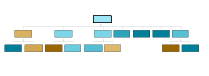
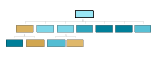
Poniższy skrypt prezentuje możliwości modułu Drzew Klasyfikacyjnych w AdvancedMiner. Proszę zauważyć, że ten skrypt nie zawiera zbioru danych, który jest niezbędny do uruchomienia w AdvancedMiner Client. Pełny kod źródłowy wraz z danymi można znaleźć w dodatku Przykłady.
Przykład jak zastosować stworzony model znajduje się w rozdziale Stosowanie modeli w AdvancedMiner.
Przykład 19.1. Building a tree model
# Description:
#    This example shows how to create a decision tree classifier.
#    The dataset used is 'zoo'. The predicted target id is 'catsize'.
#    The algorithm tries to learn on other attributes, whether
#    animal size is catsize or not.
#
#   animal attribute is turned off
#   (by setting its usage to inactive)
#
# Remarks:
#   This script uses data which was generated by the "zoo" script from
#   the "data" folder

if not tableExists('zoo'):
 raise "Table 'zoo' does not exists. Please run zoo.gy script from data directory first"


# Create building task object, this will produce
#  sample_cl_settings, and after executing this
#  task, created_model will also be available
bt = MiningBuildTask('zoo_data', 'zoo_cl_settings', 'created_model')

# Create physical data from a previously prepared dataset
pd = PhysicalData('zoo')

# Generate logical data from physical data
ld = LogicalData(pd)

# New Classificatin function settings
fs = ClassificationFunctionSettings()

# the generated logical data is assigned to function settings
fs.logicalData = ld

# Turn off attribute animal from learning
fs.attributeUsageSet.getAttribute('animal').usage =\
 UsageOption.inactive

# TargetAttribute name describes which value is taken as the
# target for classification
fs.targetAttributeName = 'catsize'

# Will use Decision Tree algorithm settings
fs.algorithmSettings = TreeSettings()

# Sets the minimal sample count for node to 1
fs.algorithmSettings.minNodeSizePrc = 1

# Sets the split evaluation fuction used when the tree is built.
fs.algorithmSettings.splitEvaluation = SplitEvaluation.entropy

# Sets the maximum child node count to 10
fs.algorithmSettings.maxNodeRank = 10

# All created objects have to be saved in the metadataRespository
save('zoo_data', pd)
save('zoo_ld_train', ld)
save('zoo_cl_settings', fs)
save('zoo_building', bt)

# And finally build task is executed
print "Executing build task"
execute('zoo_building')
print "Model 'created_model' created"
print "\nEnd of script"

# Description: queries existing model for rules in leaves

# load the model
model = load('created_model')
# printing rules
print "Rules in leaves:"
# iterate over all leaves, the current leaf is assigned to the
# leaf variable
for leaf in model.modelStatistics.allLeaves:

    # print some node statistics
    print "**Node %d, count: %g" % (leaf.nodeID, leaf.count)
    print 'RULE:'
    print leaf.nodeRule
    print 'Predicted value:'
    print leaf.getPredictedValue()
    print '---'
Output:
Executing build task
Model 'created_model' created

End of script
Rules in leaves:
**Node 1, count: 4
RULE:
type IN ('amphibian')
Predicted value:
false
---
**Node 3, count: 16
RULE:
type IN ('bird') AND
airborne IN ('true')
Predicted value:
false
---
**Node 10, count: 4
RULE:
type IN ('bird') AND
airborne IN ('false')
Predicted value:
true
---
**Node 11, count: 13
RULE:
type IN ('fish')
Predicted value:
false
---
**Node 14, count: 8
RULE:
type IN ('insect')
Predicted value:
false
---
**Node 15, count: 10
RULE:
type IN ('invertebrate')
Predicted value:
false
---
**Node 18, count: 41
RULE:
type IN ('mammal')
Predicted value:
true
---
**Node 29, count: 5
RULE:
type IN ('reptile')
Predicted value:
false
---
Rysunek 19.23. Wizualizacja modelu drzewa. Część struktury drzewa wygenerowana za pomocą przykładowego skryptu.
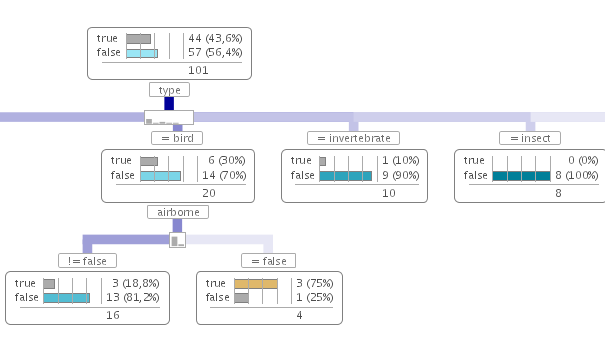
Następny przykład pokazuje użycie skryptu do modyfikacji istniejącego modelu poprzez przycinanie wybranych węzłów. Poniżej widać fragment struktury drzewa przed i po modyfikacjach.
Przykład 19.2. Przycinanie wybranych węzłów
# Opis: skrypt modyfikujący istniejący model
#  przez przycinanie wybranych węzłów

# lista id wezłów, które należy przyciąć
nodePruneList = [ 22, 47 ]

# sprawdzenie czy model istnieje
if not exists('created_model'):
    raise 'please run first example for classification trees module'

# załadowanie modelu
model = load('created_model')

# iteracja po wszystkich liściach, aktualny liść jest przypisywany do
# dedykowanej zmiennej
for node in model.modelStatistics.allNodes:
    if node.nodeID in nodePruneList:
        node.isLeaf = 1

# zapisanie stworzonego modelu
save('created_model', model)